
You are logged in as a guest, we recommend that you log in or go
process of registration. If you forgot your password, you can restore it
Navigation
Top News
Statistics
Advertisement
Аrchives
Votes
| Rate the site |
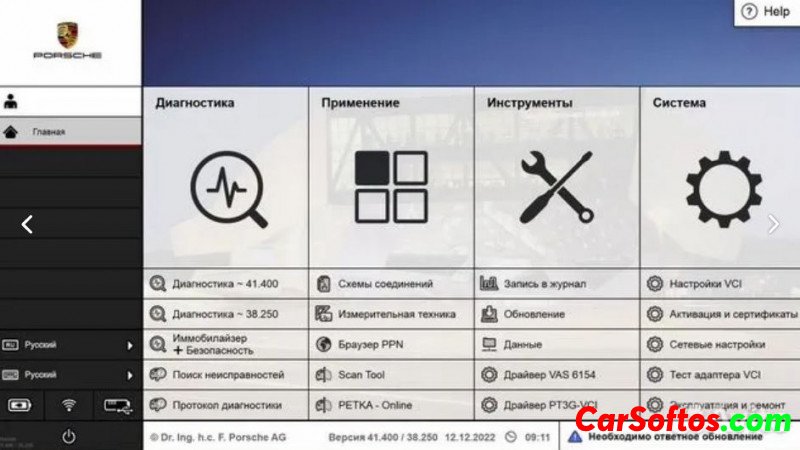
Porsche Piwis 3 41.500 + 38.250 for VAS 6154 / VMware [2023]
Author: carsoftos777 | 7-04-2023, 13:12 | Programs for cars and diagnostics | Views: 8 109 | Comments: 5 | Found a bug?
Description:
– New versions of Porsche Piwis Tester (41.500 + 38.250);
— Full FAP diagnostic protocol;
— Complete electronic circuits of Porsche cars;
- Reading, decoding, deleting fault codes;
— Reset service intervals;
— View and save the flow of current data;
- View freeze frames of faults;
— Tests of actuators and electronic units;
— Guided troubleshooting for 2021 (Online and Offline);
– Adaptation and coding of electronic units and components of the car;
- Activation / deactivation of components, as well as hidden functions of the car;
– Retrofitting of cars, automatic and manual coding of new elements;
- Removing the protection of components (requires online access to PPN);
— Immobilizer and key programming (requires online access to PPN);
— View wiring diagrams of Porsche cars;
- PPN Online support;
— Coding and programming Taycan and Cayenne E3;
- Supports cars up to 2022;
— Engineering mode of programming of electronic control units;
- PETKA 2022 with free online update of spare parts catalogs and price list;
- There is access to the desktop (when the Porsche PIWIS TESTER 3 program is completed, the computer does not turn off);
- Updated firmware for E2 and E3 body;
- The most complete version of the original;
- Added updates and firmware database for E2, E3, Taycan, Macan, Cayenne, 992, 918S, etc.;
- Updated Diagnostic Functions and PTTD for E2, E3, Taycan, Macan, Cayenne, 992, 970, 971, 918S, 981, 911, etc.;
— Program in Russian;
- Added manual for Porsche cars and repair manual.
✅There are two versions of the program installed in this assembly:
1. Porsche PIWIS 41.500 (2022), with open engineer mode (V/E), unlimited license and additional updates.
2. Porsche PIWIS 38.250 (2020) full engineering version of the program with V/E/P operating modes, including Taycan.
The difference between development and engineering is as follows:
Engineering is a complete engineering mode that allows full control of the coding (manual coding without rules), which allows the user to make small changes to the code such as increasing boost pressure on the MFD, enabling sports gauges, as well as enabling g-force. how to run normal auto/manual coding for retrofits like PDLS+ or Xenon to LED conversion. The engineering version does not have V (aftermarket mode) or P (production mode).
Development has most of the development features but does NOT have a full development mode, NO manual coding without rules, so you can't make small changes like above. However, you can use this to add features via auto/manual coding such as PDLS+, lane keeping assist, speed sign recognition, cruise control, etc. rules).
Both versions have all other features, guided troubleshooting, vehicle maintenance, VAL, trouble codes, troubleshooting, programming, etc. The only difference is manual coding without rules and no V or P mode.
✅The specified versions of PIWIS TESTER are not trimmed or trimmed.
✅Switching between programs 41.500 and 38.250 takes place in the most proprietary Porsche PIWIS TESTER shell. There is no need to restart the computer to change the version of the program and change the operating system.
Add. Information: Attached is a working VMWare image of Piwis III with support for the Chinese VAS 6154 version 1.6.6.0! Just run this image on VMware Workstation Pro 16.2.4 or later and start Piwis3. Connect your VAS 6154.
Important!

Year/Date of Issue: 2023
Version: 41.500 + 38.250
System requirements: Windows 10 x64
Interface language: Multilingual

Tags:
Information
Users of Guests are not allowed to comment this publication.
Users of Guests are not allowed to comment this publication.